
Papa's Freezeria
Game Name: Papa’s Freezeria
Developer: Flipline Studios
Release Date: February 27, 2014
Game Type: Flash
Genre: Time management
Platform: Web Browser
Compatibility: Desktop, laptop, mobile browsers
Controls: Mouse or touch
Languages: English
Progress Save: Browser cache
Available on: PapasWingeria.io
Papa's Freezeria: Frozen Treat Paradise
In Papa's Freezeria, you play as a new employee at a frozen treat restaurant on Calypso Island. You start by taking orders, building sundaes with mixables and syrups, blending the sundaes to the customer's preference, and finally topping them off with whipped cream and other toppings. The goal is to make each customer happy and satisfied and earn tips and rewards. Papa’s Freezeria has different levels, with increasing difficulty and complexity, and requires you to pay attention to customer preferences and blending techniques to succeed.
Similar Papa’s Games You’ll Love
If you like frozen treats and precise topping placement, you’ll click with dessert-focused entries. Start with Papa’s Scooperia and scoop cookie sundaes with awesome drizzles and instaworthy layouts. Then try Papa’s Cupcakeria, where batter timing and frosting swirls scratch the same perfectionist itch. If you don’t know which game to play next take a look at our test on Which Papa’s Game to Play?
What is the Story of Papa's Freezeria?
You're getting ready to start your new job at Papa's Freezeria, a brand new restaurant on the beautiful Calypso Island! You're excited to pe into the world of frozen treats and make some new friends. As you flip through the training manual, you can't help but feel a sense of calm wash over you - after all, Papa Louie promises "Stress-Free Work" with "Great Wages & Lots of Tips"! You put on your new uniform, feeling like a pro already, and head out to meet Papa Louie.
He gives you a warm welcome and a tour of the Freezeria, showing you all the ropes and introducing you to the team. But just as you're getting settled, Papa Louie's watch starts beeping, and he's off to take care of some important business! You take a moment to glance out the window and notice something fascinating - a ship is making its way towards the dock!
As you get closer to take a look, you realize it's none other than the S.S. Louie, Papa Louie's pride and joy! And when it finally arrives, a bunch of happy customers start pouring off the ship, eager to indulge in some delicious frozen treats at Papa's Freezeria. You can't help but feel a little surprised, but also excited to meet these new customers and get started on your new job!
Controls
- Mouse or touch: tap/click to take orders, drag ingredients, and drop toppings.
How to Play Papa’s Freezeria
- Open the shop and greet the first customer right away. Click the bell, take the order, and pin the ticket to the line in arrival order. Keep tickets tidy. For example left to right is the easiest way to remember who came first.
- Pick the right cup size and soft-serve base. Drag in the mixables and then the syrup listed on the ticket. Use short, steady drags so you don’t overshoot the bars. Messy pours lower your Build score and slow everything down.
- Slide the cup to a free blender. Watch the blend meter and stop right on the mark: Chunky, Regular, or Smooth. Use the booster in quick taps to avoid overheating. If a blender gets too hot, leave it alone and move another cup to a different blender.
- Add whipped cream first, then drizzle the correct topping syrup. Sprinkle neatly, and place finishers (like cherries or cookies) centered and evenly spaced. Clean placement means higher Topping score.
- Click the waiting customer to deliver the sundae. You’ll see scores for Wait, Build, Mix, Topping and get your tips. Try to serve in arrival order unless a blender finishes way earlier.
- While one cup is blending, start building the next. When a blend is nearly done, hop to Toppings so you can finish and serve fast. This build → blend → top → serve rhythm keeps the line happy.
- Spend tips on decor (for patience) and timers/boosts (for faster blends). Small upgrades protect Wait scores and help you rank up quicker, perfect for longer shifts or picky Closers.
Developer
Flipline Studios, the famous duo of Matt Neff and Tony Solary created Papa’s Freezeria, one of the most loved entries in the Papa’s series. Set on sunny Calypso Island, Freezeria introduced tons of frozen mixables and the super-satisfying blend meter that fans still talk about.
Fun Fact: the S.S. Louie cruise docking at the start explains why your so-called stress-free summer job suddenly turns into a line out the door!
Learn the Stations
Order Station
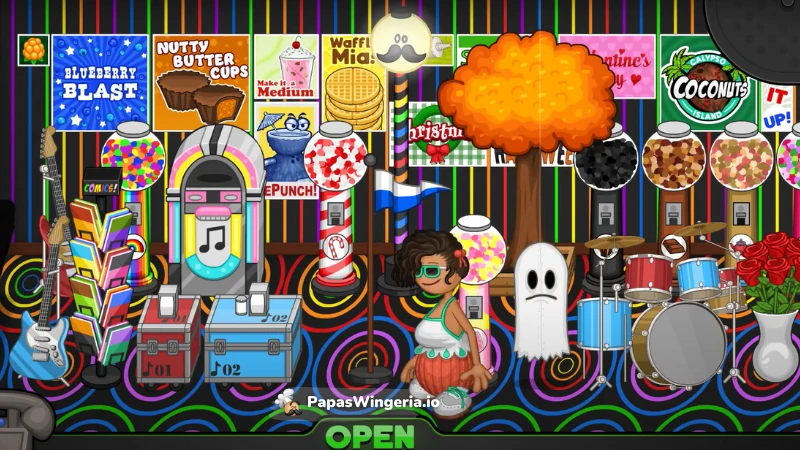
As you start taking orders at Papa's Freezeria, you'll notice that customers will make their way to the left side of the screen, ready to place their orders. When it's time to take their order, you'll get to chat with them and find out what delicious treats they're craving! If you're playing a game with a Dining Room, you'll get to see the waiter or waitress taking the order from the table. And if you're playing a game with a Delivery Phone, you'll get to answer the phone and take the order over the phone!
While you're working on their order, the customer will hang out by the Pick-Up line, maybe admiring the cool decorations or just waiting patiently for their treat. But don't forget - if you take too long to take their order or make their treat, they might get a little impatient!
When you finally present their completed order, you'll get to see how they react! Will they be thrilled and give you a big tip, or will they be disappointed and leave you a smaller tip? The better job you do making their order, the happier they'll be! And if you do an amazing job, they might even leave a glowing review!
But remember, if you don't do so well, they might not be so happy... and that could mean losing some of your progress in your mini-game ticket bar! So make sure to pay attention to what they're ordering and do your best to make it just right. After all, you want to make sure every customer leaves Papa's Freezeria feeling happy and satisfied!
Build Station
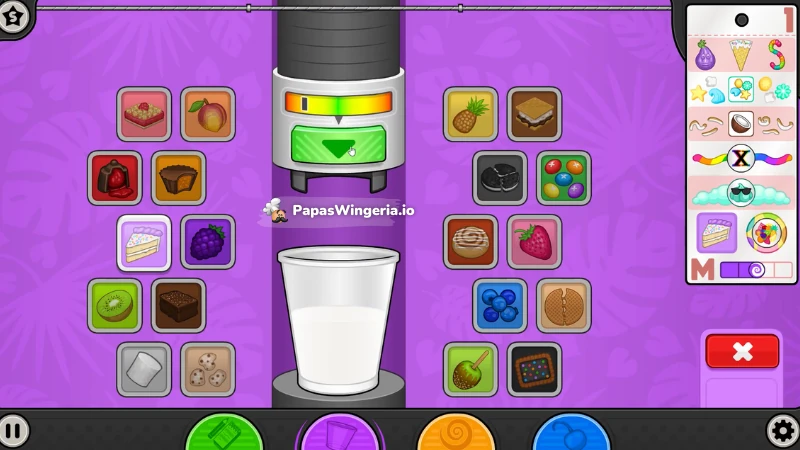
The next step in creating a delicious frozen treat is adding the perfect mixables and syrups to your customers' sundaes! This is where you get to really get creative and add that extra special something to make their treat truly unique.
As you add the mixables and syrups, you'll be able to choose from a variety of tasty options, from classic flavors like chocolate and strawberry to more adventurous choices like peanut butter and caramel. And don't forget to check out the toppings bar for even more ways to customize your customers' treats!
- Cups: Choose from Medium, Large, or Small cups.
- Mixables: Add mix-ins like Nutty Butter Cups, Strawberries, Blueberries, Birthday Cake, Fudge Brownie, Creameo Bits, Marshmallows, Pineapple, Blackberries, Cherry Cordials, Cinnamon Roll, Cotton Puffs, Kiwi, Cookie Dough, Yum n' Ms, and Peach.
- Syrups: Drizzle with Chocolate Syrup, Vanilla Syrup, Strawberry Syrup, Mint Syrup, Banana Syrup, Purple Burple Syrup, Neapolitan Syrup, Red Velvet Syrup, Blue Moon Syrup, Pumpkin Pie Syrup, Rainbow Sherbet Syrup, or Powsicle Syrup.
Mix Station
The moment of truth has finally arrived! It's time to blend your customers' sundaes to perfection! Using the combination of base, mixable, and syrup they ordered, you'll need to blend it to their specific blend preference - smooth, regular, or chunky.
As you start the game, most customers will order their sundaes with a regular blend, but as you progress through the ranks, you'll start to see some customers asking for chunkier or smoother blends. When you reach Rank 10, you'll notice some customers wanting chunky mixables, which means you'll need to blend them for less time to preserve the bigger chunks. And when you reach Rank 20, you'll see some customers asking for smoother blends, which requires blending them for a bit longer to break down the mixables into smaller bits.
But don't worry, you're not alone! You'll have four trusty blenders at your disposal to help you get the job done. And if you need a little extra boost, you can purchase boosters to speed up your blenders. Just be careful not to overdo it, or your blenders might get a little too hot and need some time to cool down!
As you work on blending your sundaes, keep an eye on those blender meters. If you press down on the booster too long, your blenders might overheat and become inoperable until they cool down. And if that happens, you might have to move the sundae to another blender to finish it off. So be careful and blend those sundaes just right!
Blend Levels
- Smooth (Blue)
- Regular (Purple)
- Chunky (Pink)
Topping Station
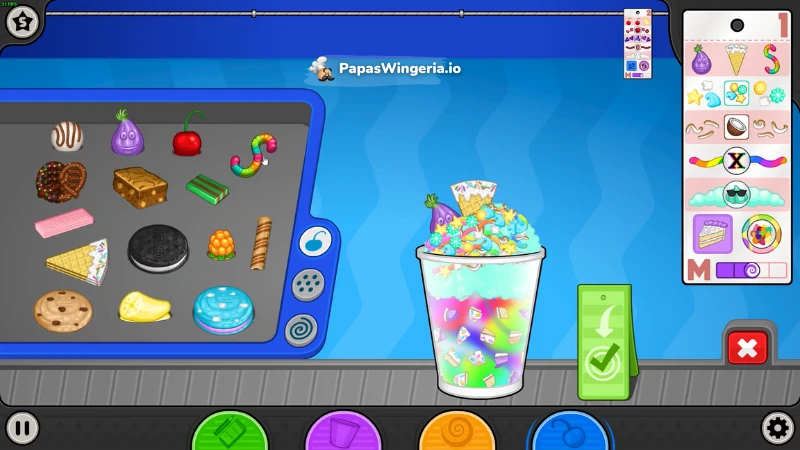
The sweetest part of the sundae-making process! In the Topping Station of Papa's Freezeria, you get to add the finishing touches to your customers' sundaes. This is where you get to let your creativity shine and make each sundae truly unique.
As you work at the topping station, you'll have a variety of delicious toppings to choose from, including whipped creams, syrups, and all sorts of tasty treats. You'll need to carefully select the perfect combination of toppings to add to each sundae, taking into account the customer's preferences and the flavor profile of their dessert.
From classic combinations like hot fudge and whipped cream to more adventurous pairings like peanut butter and caramel, the possibilities are endless! You'll need to work quickly and accurately to ensure that each sundae is topped perfectly, and that each customer leaves the shop happy and satisfied.
As you gain experience and master your topping skills, you'll unlock new toppings and flavors to add to your repertoire. And with each passing day, you'll face new challenges and opportunities to show off your creativity. So get ready to get creative and make some unforgettable sundaes!
- Topping Syrups: Use Strawberry Topping, Chocolate Topping, Butterscotch Topping, or Blueberry Topping.
- Whipped Creams: Add Whipped Cream or Chocolate Whipped Cream.
- Placeable Toppings: Include Cherries, Creameos, Bananas, Cookies, or Gummy Onions.
- Sprinkled Toppings: Choose from Nuts, Rainbow Sprinkles, Chocolate Chips, Shaved Mints, or Tropical Charms.
FAQ
Is Papa’s Freezeria worth it?
Yes, Papa’s Freezeria worth to give a chance. Especially if you like skill-based games you can play online for free. It’s easy to learn, super satisfying to master, and it runs in your browser with no download. The loop of build → blend → top → serve feels great once you get in rhythm.
What makes Papa’s Freezeria so addictive?
Short shifts, clear goals, and constant upgrades, funny characters, and variety in gameplay. Each station tests a different skill (precision pours, timing blends, neat topping placement), and you feel yourself getting better every day. Plus, unlocking new mixables and syrups keeps things fresh.
What is the goal of Papa’s Freezeria?
The goal is to make each customer’s sundae exactly as ordered to earn high scores and tips, rank up your shop, unlock new ingredients and decor, and turn your beachside Freezeria into the island’s favorite frozen-treat spot.
Who owns Papa’s Freezeria?
In the story, the shop belongs to the fictional chef Papa Louie. The game itself is created and owned by Flipline Studios.
Is Papa’s Freezeria safe for kids?
Yes. It’s a family-friendly browser game with simple controls and no violence. Younger players may need a bit of help reading, but the icons and colors make it easy to follow.
How many customers a day in Papa’s Freezeria?
It varies by day and rank. Early on you’ll usually see around 4–6 customers; as you rank up and days get busier, expect 6–8 or more. Special events and picky “Closers” arrive later and make the day feel fuller.
What day is Papa’s Freezeria Closer?
A Closer visits at the end of each work day (one per day). The first Closer shows up early in the campaign once you’ve settled into the flow. Closers are very picky, with tighter score windows. So treat them like mini-bosses for big tips.
What is the highest rank in Papa’s Freezeria?
At Rank 47 you earn the “Better Than Papa” badge. That’s the final official rank, but you can keep playing forever. However, after Rank 9999, the fifth digit doesn’t display in game.
Can you save Papa’s games?
Yes. Your progress saves to your browser cache/local storage. Switching devices, using a different browser, or clearing site data can reset progress. Want a backup how-to? Check our guide on saving and backing up Papa’s games progress on PapasWingeria.io.
Is it possible to beat Freezeria?
There isn’t a hard “The End.” It’s an endless time-management game. Many players set their own finish line: max rank, all customers satisfied, every upgrade bought, all mini-game prizes, or perfect-day streaks.
How to always get perfect in Papa’s Freezeria?
- Serve in arrival order to protect Wait scores.
- Use short, steady drags for mixables/syrups.
- Pulse the booster and stop the blend exactly on Chunky/Regular/Smooth.
- Center whipped cream and place toppings evenly.
- Buy decor early for patience and timers for blending.
What is “Chunky” in Papa’s Freezeria?
It’s a blend level that keeps larger bits of mixables. Blend for less time (and avoid heavy boosting) so the chunks stay intact. If you go too long, it turns Regular or Smooth and you’ll lose Mix points.
Where can I play Freezeria?
You can Papa’s Freezeria on PapasWingeria.io for free. Open the page, press play, and you’re scooping sundaes on Calypso Island in seconds. If you’d like to see where else you can play Papa’s games check our step by step guide.
What is the story behind Papa’s Freezeria?
You start a “stress-free summer job” at a brand-new Freezeria on Calypso Island. Papa Louie welcomes you, but then the S.S. Louie cruise ship docks and suddenly a flood of vacationers wants sundaes—leaving you to run the shop like a pro. It’s cozy, sunny, and just the right amount of busy.
Can I play Papa’s Freezeria online for free?
Yes! You can play this free game right in your browser on PapasWingeria.io. No downloads, no sign up needed. Just click play and start serving.
Does it work on a school Chromebook?
Usually yes. It’s a browser game, so as long as your device allows gaming sites, you can play. If something is blocked, try a different browser profile or play at home.
How do I save my progress?
Your ranks and items save to the browser’s local storage. If you switch devices, use a different browser, or clear site data, you’ll start fresh. Keep playing on the same device for continuous progress.
What’s the secret to perfect Blend scores?
Watch the meter closely and stop right on the line. For Smooth orders, start boosting a little earlier; for Chunky, boost late or not at all. Tap-boost in short pulses to avoid overheating.
Why did my Wait score drop even though I was fast?
Decor and posters matter. Add lobby items early so customers stay patient. Also, serve in arrival order when you can. Skipping someone for too long dings your Wait score.
Should I pre-build sundaes?
No. Recipes are precise. Instead, pre-plan: start the longest blend first, build the next sundae while it spins, and only move to toppings when a blend is nearly done.
What are Closers?
Closers are very picky end-of-day customers with tighter score windows. Give them extra attention—land your pours perfectly and keep topping placement clean.
Any quick upgrades to buy first?
Get at least one decor item for patience and a blender timer. Those two protect your Wait and Mix scores instantly, which means more tips and faster ranks.
Comments