
Cooking Stories
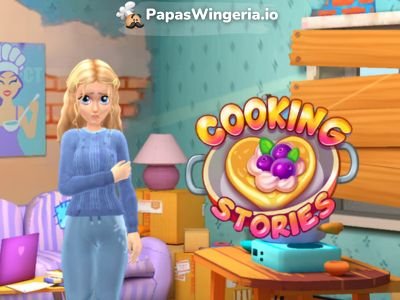
Cooking Stories is a cozy time-management and makeover game where you run a cooking show, help guests, serve tasty food, and guide Olivia on her journey to becoming a famous food vlogger. It mixes restaurant gameplay with a makeover storyline. So you’ll be cooking and serving plus you’re improving Olivia’s whole life. You’ll serve guests in a busy TV studio, upgrade kitchen tools, decorate Olivia’s room, and unlock new episodes of her story.
The whole game feels like a mix of a cooking restaurant game, a fashion salon, and a makeover show. One moment you’re rushing to bring people coffee and cake before their timer runs out. The next moment you’re picking new shoes for Olivia or fixing the holes in his walls or choosing a brand-new floor for her apartment. Everything you do helps her chase her dream.
Controls
- Point and click to pick up food, deliver food, collect payment, and clean tables.
How to Play Cooking Stories
Start your day on the cooking show set. Each level takes place inside a cute TV studio. Guests arrive, sit at tables, and wait for their orders. Before the level starts, the game shows you how many guests are coming, so you can prepare.
Your main goal is to serve fast and earn Likes. If you serve guests while their timer is still green, you get more Likes. Every level has a specific target like “Earn 9 Likes”, "Serve 5 guests", or "Serve all guests without leaving any". So the faster you serve, the easier it is to reach the goal.
Take Orders
Olivia moves automatically when you tap something she needs to pick up:
- Tap a guest to take their order.
- Tap the coffee maker, stove, or dessert station to prepare food.
- Tap the guest again to serve them.
Olivia can carry two items at the same time. If her hands get full, she cannot pick anything else up until you tap one hand (at the bottom left of the screen) to discard the item you don’t need.
Manage Timers
Each guest has a green–yellow–red timer:
- Green = serve now for maximum Likes
- Yellow = slower service, fewer Likes
- Red = they’re about to leave
Serving in the green zone is the main way to hit your level goal.
If things get hectic, you can use the Confetti booster, which makes the audience cheer and helps the participants stay patient. Boosters are limited, so use them when things get messy.
Clean Up and Seat New Guests
After a guest finishes eating:
- Receptionist taps on the customer to collect the payment.
Olivia needs to clean the tables to seat new guests. So when a customer leave, you need to
- Tap on the cleaning station to take a tray.
- Tap on the dirty dishes to clean them up while holding the tray.
- Cleaning takes time unless you upgrade your Cleaning Goods in the Upgrade Store.
- Clean tables are needed for the next guests.
Upgrade the Studio
Between levels, you can visit the Upgrade Store. You’ll see lots of items you can improve: You unlock new or more advanced food stations like:
- Reception Desk – increases how long guests can wait
- Guest Places (tables) – adds more space
- Coffee Maker – brews faster
- Stove – speeds up steak
- Dessert Station – gives faster sweets
- Sauce Machine – new ingredients
- Cleaning Supplies – makes table cleanup faster
- Steak - Steak costs more money
- Sauce Dispenser - add sauce to steak
Each upgrade changes speed or quality. For example, upgrading the stove makes steak cook faster. Upgrading the dessert table increases the cost of desserts. Cleaning materials can also be upgraded so Olivia clears tables quicker. Every dish has its own cooking time bar. When the bar fills, Olivia can pick it up. Some upgrades deliver instantly, while others take 30 minutes. Upgrades use Coins and Gems, both earned from playing levels.
Help Olivia Transform Her Life
The game has a makeover storyline. Olivia arrives in the city with a small dream: she wants to be a successful food vlogger. Her apartment is messy, her clothes are old, and everything needs improvement. You help her step by step.
Inside her apartment, you can visit:
- Room – replace furniture, clean the space, add decorations
- Wardrobe – choose new outfits, shoes, bags, or styles
- Salon – change hairstyle, hair color or makeup
- Show – unlock new episodes of her journey
Every makeover task costs Paper Money, a special green currency. You earn some from completing levels in restaurant show. There are also full story episodes. Episode 1 is called “Big City Lights.” It explains how Olivia moved to the city, left her old life, and hopes to grow into a confident creator. After Olivia you'll unlock a new character with a different cooking story!
Dress Up in the Wardrobe
Once Olivia starts upgrading her look, she can visit the Wardrobe and try on:
- Tops & sweaters
- Skirts & jeans
- Shoes
- Accessories
The dressing room is bright and stylish, with shelves full of colorful items. Anything you buy is permanent, and you can mix outfits however you like.
Renovate Olivia’s Apartment
The apartment starts rough. She doesn't have much money so her room has, broken shelves, boarded windows, boxes everywhere, old rugs and messy walls.
As you complete transformation tasks, you can: replace the floor, add wallpaper, buy new furniture ,c lean up the space, add lighting, make the apartment feel warm and cozy. Each change moves Olivia to the next stage in her transformation.
Unlock New Characters
At the bottom of the “Show” tab, you see different characters you’ll meet through the story. Only Olivia is unlocked at the beginning. Others require finishing episodes or reaching certain progress points.
More Time Management Games You Might Enjoy
If Cooking Stories makes you love the rush of serving guests, catching timers before they turn red, and trying to do everything at once without dropping a single order, then you’ll probably enjoy exploring a few other time-management games too. Cooking Live is a great place to start, because it has that same fast cooking chaos mixed with colorful kitchens and fun upgrades. You hop between food stations, take orders, and try to keep every customer happy before their patience runs out, which feels very similar to the rhythm in Cooking Stories. Another classic worth mentioning is Papa’s Hot Doggeria on PapasWingeria.io. This one brings that nostalgic Papa’s Games energy with its hot dog stand in stadium, where you grill sausages and make yummy hot dog sandwiches. If you grew up on restaurant games during the Flash era, Scooperia feels like visiting an old favorite café.
And if you like this style in general, you can always dive into our full time-management games category. It collects all sorts of cooking, serving, hotel-running, and shop-managing games in one place, so you can bounce from a bakery to an ice cream parlor or even a fashion studio in seconds. Whether you want something calm and cozy or fast and intense, the time-management section has tons of games that keep you in that satisfying “serve, upgrade, repeat” loop.
Technical Details
Developer: AY Games
Release: May 2025
Game Type: HTML5
Genre: Time-management
Languages: English, Russian
Platform: Web Browser
Compatibility: Mobile & PC
Controls: Point and click
Developer
Cooking Stories is developed by AY Games, known for mixing time-management gameplay with character-driven stories and makeovers. Their style blends cozy visuals, bright colors, and simple but satisfying mechanics.
What is Cooking Stories?
Cooking Stories is an online game about a cooking show game and a makeover story. You serve guests in a TV studio, help Olivia improve her life, decorate her room, and unlock new episodes of her journey.
Is Cooking Stories free to play?
Yes! You can play it online for free. Optional upgrades use in-game currency, but the main gameplay is fully free.
Do I need to install anything?
No, Cooking Stories runs inside your browser. Just tap Play and you’re ready to go.
Who is Olivia in Cooking Stories?
Olivia is the main character. She dreams of becoming a famous food vlogger. You help her serve guests, upgrade her look, and fix up her tiny apartment in the city.
How do I earn Likes?
Serve guests while their timer is still green. The faster you serve, the more Likes you earn. Each level has a Like goal you must reach.
What happens if both of waitress' hands are full?
She can’t pick anything else up. Tap one of the items she’s holding to discard it and free a hand.
How do upgrades work?
You can visit the Upgrade Store to improve things like the stove, coffee maker, dessert table, cleaning supplies, and more. Upgrades make everything faster and easier.
What are Paper Money and Gems for?
- Paper Money (green bills) is used for makeover tasks like new floors or hairstyles.
- Gems are used for faster or special upgrades in the studio.
You can earn both while playing.
Can I change Olivia’s clothes?
Yes! Go to the Wardrobe to try on outfits, shoes, accessories, and hairstyles. Many items unlock as you progress through the story.
Why is Olivia’s apartment so messy in the beginning?
That’s part of the story. She just moved to the city to follow her dream, so she starts with very little. You help her clean and rebuild everything step by step.
What is the Confetti booster?
Confetti is a special booster that makes the audience cheer and keeps guests patient for a short time. It’s perfect for busy moments!
Do levels get harder?
Yes, but slowly. You’ll serve more guests, handle multiple dishes, and juggle more items. Upgrading your tools and cleaning speed helps a lot.
Are there more characters besides Olivia?
Yes! As you progress through episodes, you unlock new characters who join the story and the show.
Is Cooking Stories similar to Papa’s Games?
It has time-management gameplay like Papa’s Wingeria and Papa’s Pizzeria, but with a makeover and story style added on top. Cooking Stories has 3D visuals and more romantic vibe while Papa's Games has 2d visuals and funnier gameplay.
Comments