
Burger Restaurant Simulator 3D
Game Name: Burger Restaurant Simulator 3D
Developer: Mirra Games
Release Date: September 2025
Game Type: Html5
Genre: Simulation
Platform: Browser, Windows
Languages: English, Turkish, Russian, Portuguese, Polish, Japanese, Italian, Indonesian, French, Spanish, German
Controls: Keyboard & Mouse
Compatibility: Works on PC laptop, Chromebook and Mobiles
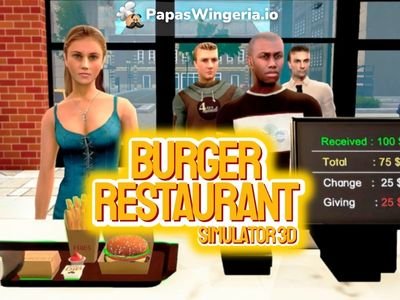
Ever wonder what it’s like to work at a Mcdonalds? Burger Restaurant Simulator 3D lets you find out. You start in your own little fast-food shop, and it’s your job to run everything like cook, serve, clean, take the orders and the payments and make customers happy. 🍔
It feels just like being behind the counter at your local Burger King. The grill is on, orders just keep coming in, and you have to stay quick on your feet. You’ll grab buns, fry patties, pour drinks, and hand out the right change in the cashout. When it gets busy, things can get a little crazy but that’s what makes it fun.
The game looks simple, but once you start playing, you realize how much there is to do. You’re flipping burgers one minute and dealing with cash the next. Then you’re running to restock ingredients before the next rush hits. It’s fast, it’s loud, and it actually feels like you’re in a real restaurant.
And yeah, sometimes you’ll notice you don't have any ketchup left right in the middle of an order. it happens! But every day you get better at it. Before long, you’ll be running your place like a pro, unlocking new machines, hiring workers, and turning your tiny diner into a big burger joint.
If you’ve ever wanted to know what it’s like inside a busy fast-food kitchen, this game nails it. It’s a mix of chaos, fun, and that weirdly satisfying feeling of watching your burgers line up perfectly on the counter.
Controls
- Mouse – Look around and aim
- E / Left Mouse Button – Pick up or interact with items (like boxes, ingredients, or machines)
- F – Throw or drop items
- TAB – Show or hide the mouse cursor
- W, A, S, D – Move around the restaurant
- Esc – Pause or open the settings menu
How to Play Burger Restaurant Simulator 3D
When you begin, you’ll see a small burger shop with basic furniture and limited funds. The tutorial helps you get started follow the yellow arrow to pick up your first box of buns. Use E to grab it and carry it inside your restaurant. Place it on a shelf or counter so it’s ready for cooking later.
Each ingredient arrives in its own box at the back of the store (buns, cheese, meat cutlets, etc.). Organize them properly so your kitchen stays tidy and efficient.
Stock Up on Supplies
Head to your tablet or computer to open the store menu. You’ll find several categories:
- Products – Ingredients like buns, raw cutlets, cheese, coffee beans, and drinks.
- Places – Tables, sofas, and decor for your dining area.
- Zones – New areas like a staff room or kitchen extension.
- Equipment – Machines and kitchen tools like coffee makers, fryers, and soda dispensers.
Use the + and – buttons to select the quantity of each product, then hit BUY. Your order will appear outside the restaurant in delivery boxes. Click on the box to grab it, carry them in and unpack them to restock. Trash the empty box. Keep an eye on your cash! Ingredients cost money, and running out means you can’t serve your guests.
Take Customer Orders
Go in front of the store and click on the closed sign to open the restaurant opens. Then, customers will start walking in. They’ll line up at the counter to place their orders.
For cash payments, give them the correct change using the money and coin buttons.
For card payments, type in the total amount and press OK to confirm.
Accurate payments increase your customer satisfaction and improve your reputation. Mistakes might make them angry and reduce tips.
Cook the Perfect Burger
Now comes the fun part: cooking! Move to the kitchen area and interact with the grill.
- Pick up a raw cutlet and place it on the grill using E.
- Clik on the grill to turn it on and wait until it’s perfectly cooked (you’ll see the sign).
- Take the grilled atties and put it in the middle station.
- Here you'll click on the bottom bun, a patty, ketchup and top bun in the right order. As you progress you'll also unlock new ingredients like cheese, tomatoes onions etc. Assemble the burger in the correct order and it will be automatically served to the tray. The customer will take it from the counter.
Use the ingredient tray to organize everything neatly: cooked meat, buns, nuggets, and sauces are all there. Try not to overcook your patties or let food burn as it affects quality and your tips.
Clean Up the Burger Place
When customers finish eating, it’s time to clean the tables. Keep your restaurant clean by picking up trash or spills otherwise, customers may leave unhappy. You’ll eventually unlock the option to hire a Cleaner (available after buying a staff room and reaching Level 5). Later on, you can also hire a Cashier at Level 9 to help with the front counter so you can focus more on cooking and managing.
Decorate Your Restaurant
Once you start earning consistent money, you can use it to buy upgrades. Open the shop menu again to browse:
- Tables & Sofas: Give your guests a cozy place to sit. Increase the amount of customers.
- Coffee Machines and Fryers: Add new menu items like fries, nuggets, or coffee.
- New Zones: Unlock more kitchen space, staff rooms, or new serving areas.
The more furniture and equipment you add, the more customers your restaurant can serve at once. With each level, you’ll attract more guests, unlock new recipes, and boost your daily profit.
Grow Your Business
Each day in the game represents a new work shift. You’ll start at 9:00 AM, and your goal is to manage your time well between cooking, serving, cleaning, and restocking.
Earn enough experience points, and you’ll level up, unlocking more features, workers, and machines.
By Level 5, you can hire your first staff member. By Level 7, you’ll gain access to soda machines. Keep leveling up to expand your empire and open new branches in other locations!
Manage Money
Running a restaurant isn’t just about cooking as it’s about smart management. Watch your income and expenses at the top-right of the screen.
Here’s a quick guide:
- Buy products in bulk to save time.
- Avoid unnecessary furniture early on and focus on essentials first.
- Upgrade gradually: new machines and zones come with higher maintenance costs.
Balancing your finances is key to long-term success. A poor day’s earnings can slow down your progress, so keep everything running smoothly.
Keep Guests Happy
Customer satisfaction is everything! Serve food quickly, keep the place clean, and ensure accurate payments. As your reputation grows, more visitors will come and they’ll pay more for your meals. Try to avoid delays or messy service, as it can lead to bad reviews (and lost income).
Developer
Burger Restaurant Simulator 3D is developed by MirraGames, known for their creative business and life simulators. The studio specializes in casual 3D games that let players experience everyday jobs in fun, hands-on ways. From managing shops to running restaurants, their games always mix strategy, creativity, and a bit of humor.
More Restaurant Games You’ll Love
If you enjoyed running your burger business, check out more free online restaurant simulators you can play on PapasWingeria.io. You can play Papa's Burgeria and cook delicious burgers and play mini games between work days. Perfect for fast-paced players who love variety! Or perhaps you can play Idle Coffee Business and manage your own cozy coffee shop, unlock drinks, and watch profits rise even while you’re offline. All games are completely free to play online on PapasWingeria.io, no downloads needed.
Comments